



If you work in Canadian primary care, you have almost certainly heard of OSCAR EMR — and you may have wondered exactly what it is, where it came from, why it shows up under so many different names, and how clinics actually use it day to day. This is the complete guide: what OSCAR EMR is, its open-source roots and variants (including OSCAR Pro), how to get started with it, how to extend it with online booking, telehealth, automation and payments, and where to go next for training, pricing, login, or integration questions.
What Is OSCAR EMR?
OSCAR EMR is an electronic medical record (EMR) system used widely in Canadian primary care. “OSCAR” is usually given as an acronym for Open Source Clinical Application Resource (sometimes written “…and Resource”). It is the software a clinic uses to manage patient charts, appointment scheduling, billing, prescriptions, lab results, and clinical documentation — the digital backbone of a modern medical practice.
What sets OSCAR apart from most commercial EMRs is its licensing model. OSCAR is open-source software: its source code is publicly available, and it is distributed under the GNU General Public License (GPL) rather than sold as a closed, proprietary product. In practice this means no single vendor “owns” OSCAR the way one company owns a typical commercial EMR. Instead, an ecosystem of service providers hosts, supports, and extends it for clinics. (The OSCAR name itself is a registered trademark of McMaster University; the various distributions are built on the shared open-source code but are not all run by the university.)
Technically, OSCAR is a web-based application: it runs on a server and clinic staff use it through a browser, so there is no desktop software to install on each workstation. The open-source code is a Java application that runs on a standard Java web server and stores its data in a MySQL/MariaDB database. Most clinics never deal with any of that directly — a service provider runs the servers — but it explains why OSCAR is reached through a login URL rather than an installed program, and why hosting is something a provider does for you.
If you are new to electronic records in general, our guide to what an EMR is in medical terms is a good companion read, along with the difference between an EMR and an EHR.
Where OSCAR EMR Came From
OSCAR was started in 2001 by the Department of Family Medicine at McMaster University in Hamilton, Ontario, with Dr. David Chan widely credited as its driving force. The first release followed in 2002. It began as an academic project to give family physicians a capable, affordable, web-based electronic record, and it grew into one of the most established EMRs in Canadian primary care.
Because it was built by clinicians and academics rather than a commercial vendor, OSCAR was shaped around the realities of Canadian family practice — provincial billing, panel-based primary care, and the documentation patterns of community clinics. That heritage is a large part of why it remains popular today.
OSCAR Is Not One Single Product: The Variants Explained
This is the part that confuses most people new to OSCAR. Because the software is open-source, multiple organizations have built their own hosted, supported versions of it. When clinic staff say “we use OSCAR,” they could mean any of several related-but-distinct systems:
- OSCAR Pro — the commercially supported, WELL-Health-backed hosted version of OSCAR; the largest-by-clinic-count variant in Canada. See the OSCAR Pro variant section below and our dedicated OSCAR Pro guide.
- Juno EMR — a modernized, cloud-hosted EMR that evolved from the OSCAR codebase, with a refreshed interface and its own hosting and support.
- Avaros — another OSCAR-derived hosted EMR offering, with its own login and provider support.
- OpenOSP — an open-source-oriented OSCAR hosting option run as a member-owned cooperative, often chosen by clinics or groups that want a community-supported deployment.
- Self-hosted / community OSCAR — some clinics, health authorities, or academic groups run their own OSCAR installation directly, typically from the Open-O open-source distribution.
These variants share a common OSCAR lineage, so the core concepts — the scheduler, the eChart, billing, ticklers, eForms — are broadly familiar across them. But hosting, pricing, support contacts, and the exact interface differ. That is also why there is no single universal OSCAR login page: the correct URL depends on which variant your clinic uses. For a side-by-side reference and EMR-match notes, the Cortico EMR compatibility guide is a useful companion.
See how the Cortico plug-in brings secure messaging and virtual visits directly into your OSCAR setup in this EMR demo video.
OSCAR Pro — the WELL-branded commercial variant
OSCAR Pro is the most widely deployed commercial variant of OSCAR in Canada. It is the hosted, supported flavour offered by WELL Health — a private operator that took over the OSCAR Pro line as part of its consolidation of Canadian EMR vendors — and it is what most clinics that “bought OSCAR from a vendor” are actually running.
Compared with the underlying open-source OSCAR code, OSCAR Pro is the same clinical core wrapped in a managed service: WELL runs the hosting, manages updates, handles support contracts, and provides onboarding. For the clinic, that means a recognizable OSCAR scheduler, eChart and billing module, with a vendor relationship and SLA behind it rather than an internal IT lift.
A few practical things to know if your clinic is on OSCAR Pro (or evaluating it):
- Login is per-clinic. OSCAR Pro doesn’t have a single universal login page — each clinic gets its own URL, issued by the OSCAR Pro helpdesk. Our OSCAR EMR login guide has the details.
- API access goes through the provider. Enabling third-party integrations (booking, telehealth, payments, automation) typically requires OSCAR Pro’s sign-off and configuration. The mechanics are the same OAuth-based flow described in our OSCAR EMR API and integration guide, but the enablement path runs through WELL/OSCAR Pro support.
- Pricing is quote-based. OSCAR Pro typically bills per provider per month, with separate one-time charges for setup, migration and training; see our OSCAR EMR cost guide for the components to compare.
For the deeper write-up — including how OSCAR Pro fits alongside Cortico for online booking, telehealth, automation and payments — see the standalone OSCAR Pro article.
Who Uses OSCAR EMR in Canada?
OSCAR and its variants are used widely in Canadian primary care — family practices, community clinics, walk-in clinics, and academic and teaching settings, where it has been adopted by family medicine departments at several Canadian medical schools. It has a particularly strong presence in Ontario and British Columbia, the two provinces where its community and service-provider ecosystem is most developed. Precise national user counts are hard to pin down, because the open-source software can be self-installed without central registration — but thousands of clinicians across Canada use OSCAR, and it remains the leading open-source EMR in Canadian primary care.
It is most commonly chosen by independent and small-to-mid-size clinics that value an established, clinician-built system and the flexibility of an open ecosystem, rather than a single locked-in vendor relationship.
OSCAR EMR: Strengths and Trade-offs
No EMR is perfect for every clinic. A fair summary of OSCAR’s strengths and trade-offs:
Strengths
- Open-source and established. Decades of use in Canadian family medicine and a large user community.
- Built for Canadian primary care. Provincial billing and family-practice workflows are first-class, not afterthoughts.
- An ecosystem, not a monopoly. Multiple service providers means clinics can choose a hosting and support arrangement that fits — and switch providers without changing EMR families entirely.
- Extensible. A rich library of eForms and a long history of third-party integrations.
Trade-offs
- The variant landscape is confusing. New staff often struggle to work out which OSCAR they are actually on, and support contacts differ by provider.
- The interface can feel dated. Depending on the variant and version, the user experience may lag behind newer commercial EMRs.
- Support quality depends on your provider. Because OSCAR is open-source, your day-to-day support experience is set by the service provider you choose, not by “OSCAR” itself.
- Onboarding takes effort. OSCAR is deep, and new clinics should budget real time for training.
If you are still comparing systems, our guide on how to choose an EMR in Canada covers the wider decision.
Getting Started with OSCAR EMR
This section is the daily-basics walkthrough for clinic staff new to OSCAR: logging in, the scheduler, opening a chart, billing, prescriptions, ticklers, and eForms. It is a starting point, not a replacement for full training.
A note before you start: OSCAR is open-source, and clinics run different variants — OSCAR Pro, Juno, Avaros, OpenOSP, or a self-hosted install. Exact menu names, screen layouts, and shortcuts differ between them and between versions. The steps below cover the concepts and workflows that are common across OSCAR variants; your screen may look slightly different.
Logging in
There is no single universal OSCAR login page — the URL depends on your clinic’s variant and provider. Get the correct login URL from your clinic manager or your provider’s helpdesk, and bookmark it. Our OSCAR EMR login guide has the quick links for Juno, Avaros, OSCAR Pro and OpenOSP.
Logging in usually means more than a username and password. OSCAR’s open-source code also asks for a short numeric PIN alongside the password, and many hosted variants now add two-factor authentication (a one-time code from an authenticator app) — so on your first login you may be asked to set up a PIN or scan a QR code. This is normal; ask your administrator what your clinic uses.
Once you are in, you will typically land on the main scheduler / appointment screen — the default home screen for most OSCAR users, though it can be configured differently per clinic, variant, or user role.
Two early habits worth forming: never share your login (every action in an EMR is tied to a user for audit reasons), and always log out or lock your screen when you step away.
The appointment scheduler
The scheduler is where most clinic staff spend their day. It typically shows a day or week view, with columns for each provider and time slots down the side.
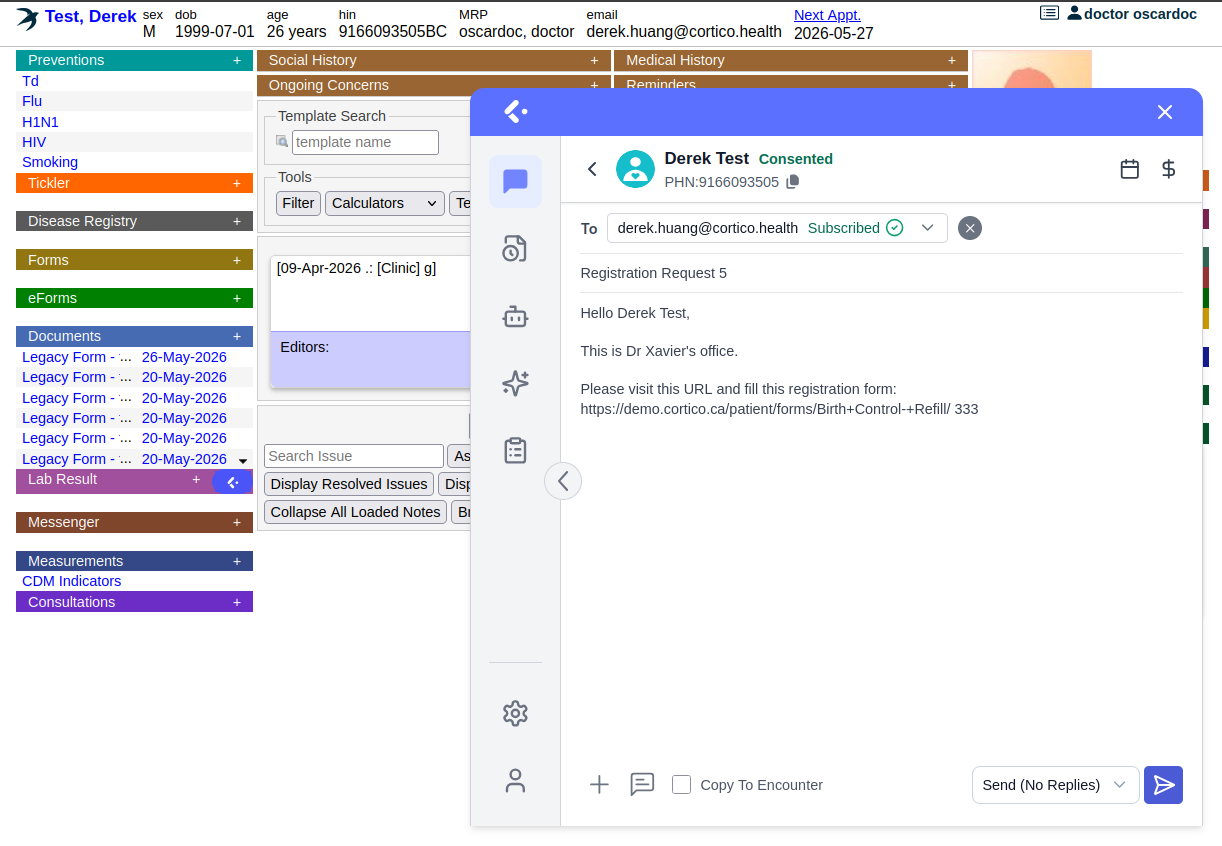
Core tasks on the scheduler:
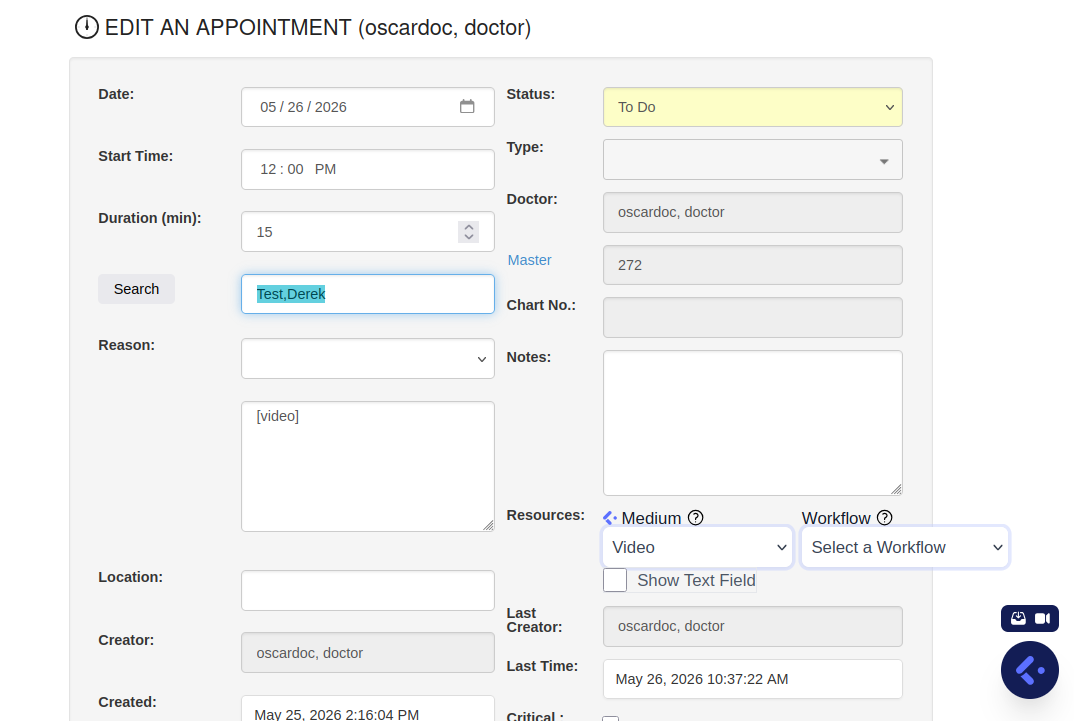
- Book an appointment — click an open time slot, search for the patient, select the appointment type and reason, and save. If the patient is not in the system yet, you will create their record first.
- Find a patient’s appointment — use the search function rather than scrolling.
- Change or cancel — open an existing appointment to reschedule or cancel it; record cancellations properly so reporting stays accurate.
- Appointment status — OSCAR uses status indicators to show where a patient is in their visit (for example, booked, arrived, being seen, billed). Learn your clinic’s status conventions early — they keep the whole team coordinated.
A practical tip: most clinics establish their own colour and appointment-type conventions. Ask a colleague to walk you through your clinic’s specific setup on day one.
The demographic record, eChart, and daily tools
When a new patient comes to the clinic, you create their demographic record — the master file holding their name, date of birth, health card number, contact details, and provider assignment. Accuracy here matters more than speed: the health card number drives billing, and a wrong digit causes rejected claims later. Once the demographic exists, the patient can be booked and given a chart.
The eChart (electronic chart) is the clinical heart of OSCAR — encounter notes, medications, allergies, medical history, preventions, and incoming documents and labs all live there. Encounter notes are dated and attributed to the author; allergies are recorded prominently for safety; preventions track screening and immunizations. Front-desk staff and MOAs typically have read access to parts of the chart and edit access to others, depending on role and clinic permissions.
Three other daily tools are worth learning early:
- Billing. OSCAR’s billing module is province-specific — the fee codes and claim-submission process for Ontario differ from BC, and so on. As a new staff member you do not need to master billing on day one, but you should understand the link: an appointment is seen, a billing code is attached, and a claim goes out.
- Prescriptions. Managed inside the eChart. A provider opens the prescription module, adds or renews a medication, and prints or transmits the prescription. The medication appears on the patient’s medication list for future reference and renewals. Renewals are a common daily task.
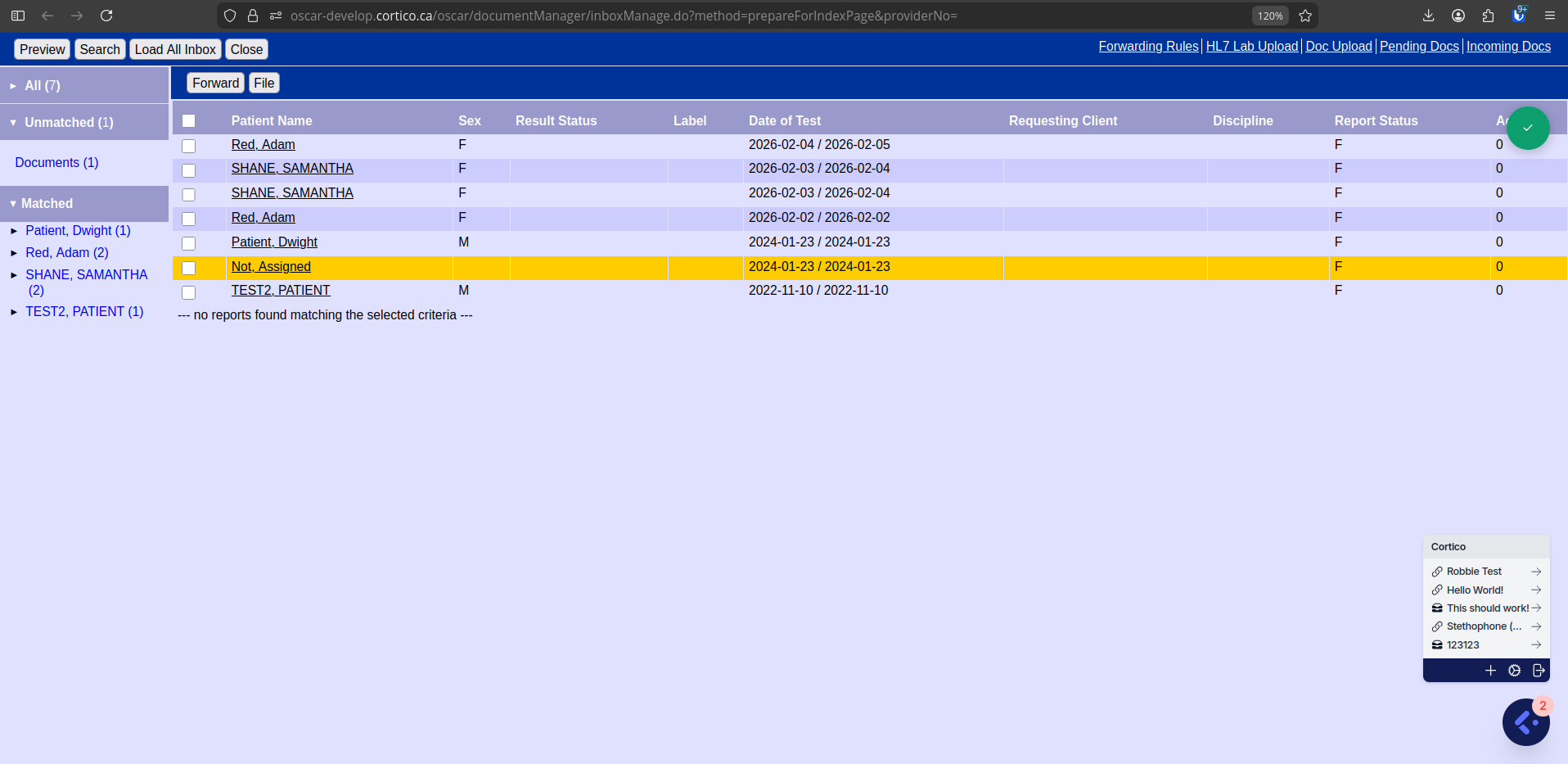
- Ticklers. OSCAR’s built-in task and reminder tool — a to-do item attached to a patient (“follow up on lab result,” “recall for annual check”), assignable to a staff member with a due date. Check your tickler list daily; it is often where your work for the day is queued.
- eForms. Electronic forms — referrals, intake, assessment forms. OSCAR has a large eForms ecosystem; learn the handful your role uses most, and learn how to search for the rest.
A few practical tips: use search rather than scrolling, learn your clinic’s appointment-type and status conventions early, and when in doubt don’t guess in the chart — an EMR is a legal medical record. For deeper learning, see the best OSCAR EMR training resources.
Online Booking on OSCAR EMR
“Online booking” can mean two very different things. In the looser sense, a booking widget on the clinic website takes a request that staff later key into the EMR — the system moved the friction, it didn’t remove it. In the strict sense, the patient picks a real slot against live availability and the appointment lands in OSCAR immediately, with no request queue and no re-entry. For an OSCAR clinic, the distinction matters: option two is what actually removes work.
Most booking tools handle simple new-patient appointments and leave everything else on the phone. The familiar pattern is a clinic that launches online booking, captures the easy 30% of bookings, and finds the phones just as busy because the complicated cases — eligibility-restricted appointments, longer consults, provider-specific rules — still need staff intervention. Closing that gap takes a booking engine that handles those cases too, while honouring the appointment types, durations, and provider availability already configured in OSCAR — so a self-booked appointment is correct on arrival and needs no fix.
An OSCAR-integrated booking layer is built for that whole booking workload — appointment types, durations, and provider rules already configured in OSCAR are honoured by the booking flow, so a self-booked appointment is correct on arrival. Booking is most useful as part of a connected setup rather than a standalone widget — booked patients still need reminders, some will want a virtual visit, and some appointments need a private-pay invoice attached, which leads into the next two sections.
Telehealth on OSCAR EMR
Telehealth for an OSCAR clinic is one of the awkward integration points: the EMR is in one tab, the video call is in another, and the documentation moves back and forth between them. Even the better stand-alone video tools assume the chart lives elsewhere — staff end up managing two systems, and visit data ends up split across a consumer video app and the EMR.
An in-EMR approach removes that split. The provider starts a secure video visit straight from the patient’s OSCAR encounter, with the chart open beside the call, and documents the visit in OSCAR like any other encounter — no copying notes between systems, no separate telehealth platform to manage. The patient joins from a single secure link in their browser — no download, no account, no password — so visits start on time instead of turning into a tech-support call.
Running telehealth through a consumer video app means patient visit data lives somewhere outside the EMR, which is a privacy exposure the clinic has to account for. An OSCAR-integrated telehealth layer keeps the visit tied to its OSCAR encounter, with no video or visit data stored elsewhere — and, where the integrator is itself a compliant healthcare vendor, the video stream is encrypted and the stack is built to meet HIPAA, PIPEDA, and PHIPA.
Automation, AI & Payments on OSCAR EMR
Most of what wears down an OSCAR clinic’s staff is not clinical. It is the inbox — inbound faxes to triage, follow-ups to chase, recalls to run, private-pay invoices to send, no-show fees that nobody collects. OSCAR keeps the chart in order, but on its own it does not do that work. An automation and payments layer turns OSCAR from a record-keeping system into something closer to a complete clinic operating platform: the chart is still the source of truth, but the routine work is increasingly handled before anyone touches it.
AI automation across the OSCAR workflow
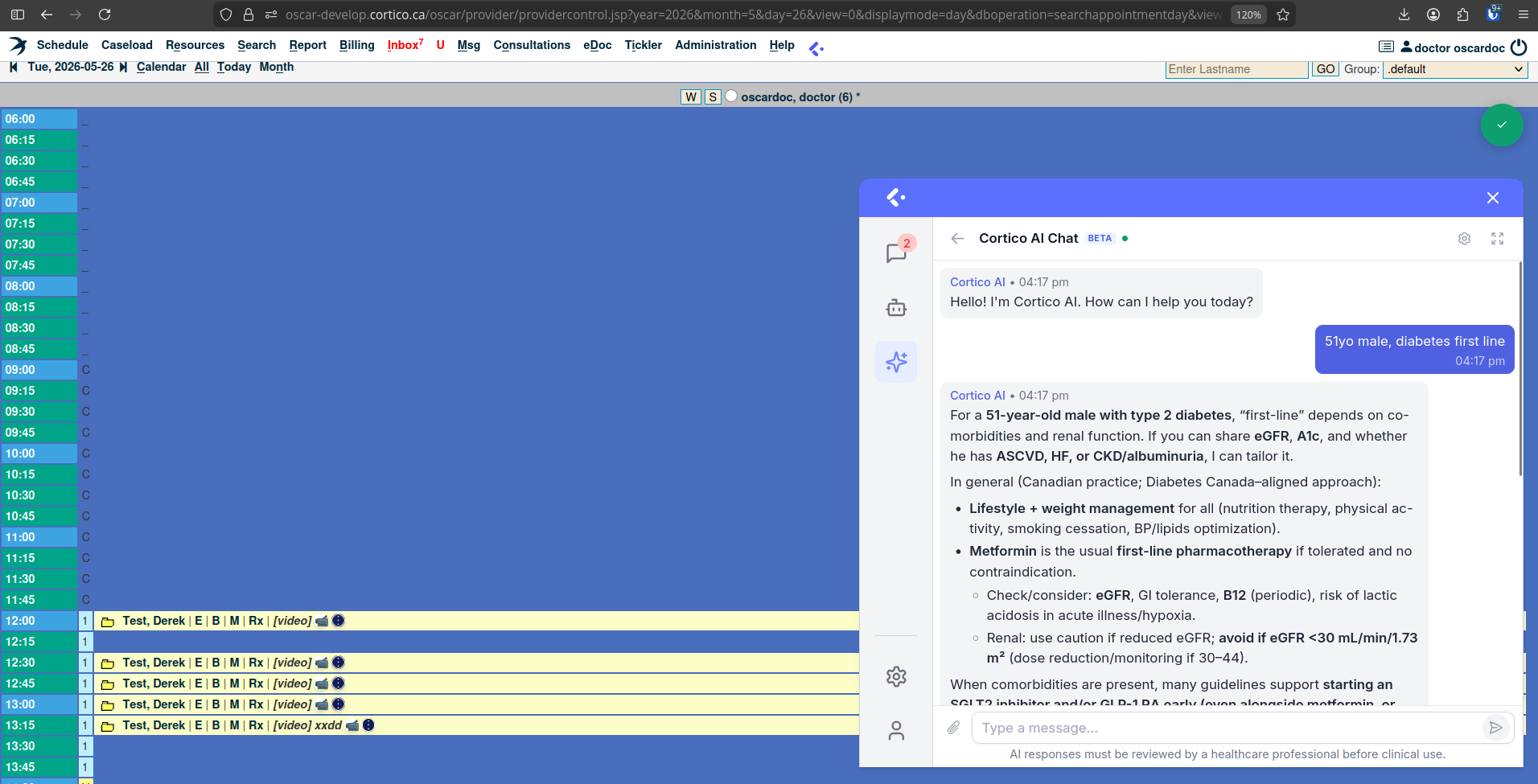
Two areas tend to be the biggest near-term wins. Fax remains the dominant inbound document channel for most Canadian primary care clinics, and AI-driven fax auto-triage sorts the inbox automatically — labelling, routing, and queuing each document so staff only handle the exceptions. Patient follow-ups are the other: EMR task automation runs recalls, post-visit check-ins, and intake reminders on their own, against OSCAR’s record of what has and has not happened. Automation in this layer compounds — each tool removes a category of routine work, and the savings stack as more of the suite is in use. For the wider toolkit, see healthcare AI automations.
Payments and revenue tools, connected to OSCAR
An OSCAR clinic’s revenue does not stop at insured billing. Uninsured services, completed forms, no-show fees, and private-pay visits are all real income that is easy to lose without the right tooling — for many primary care clinics, private-pay leakage and unenforced no-show policies are the single largest fixable revenue gap. An OSCAR-integrated payments layer collects for private-pay services and enforces missed-appointment policies automatically — all without staff handling money or chasing payment. Invoices attach to the OSCAR record so the financial side of the chart stays consistent with the clinical side.
Stitching together separate tools for booking, messaging, payments, and automation creates exactly the integration mess most clinics are trying to escape — each new vendor adds another login, another support contact, another fragile integration. An integrated suite is one platform: booking, telehealth, communication, payments, and automation share a single patient record and sync to OSCAR together.
Cost, Training, Login, and API — Quick Pointers
These four topics each have a full dedicated guide; this section is the high-level pointer.
Cost. OSCAR EMR has no single price tag, because what clinics pay for is not the software licence but the services around it — hosting, support, setup, migration, training, support tier, and add-ons. The cheapest monthly headline is rarely the cheapest system once setup, migration, support, and add-ons are included. Budget by total cost of ownership over 3–5 years, get itemized written quotes, and confirm whether each provider bills per-provider or per-clinic. Full breakdown in OSCAR EMR cost: how pricing really works.
Training. Most clinic staff can handle day-to-day OSCAR tasks within a few days of hands-on use, with billing, eForms, and ticklers usually settling in a few weeks. There is no single official manual because of the variant landscape, but the OSCAR Canada User Society manual, the World OSCAR knowledge base, OSCAR-BC training PDFs, and Adrian S.'s OSCAR training course at emrtraining.org are widely used. Full roundup in OSCAR EMR training: best resources.
Login. There is no single universal OSCAR login page — the URL depends on your variant. Juno and Avaros each have a public login page; OSCAR Pro and OpenOSP issue per-clinic URLs through their helpdesks. The shortcut links are in OSCAR EMR login: find your clinic’s login page.
API & integration. OSCAR’s REST/web-services layer (under /ws/) covers most of the clinical record — scheduling, demographics, billing, prescriptions, documents, ticklers, labs, eForms — and authorizes external clients via OAuth. The exact API surface, authorization steps, and enablement path depend on your OSCAR variant and service provider. Full walkthrough — including a worked OAuth-handshake example, the read/write demographic flow, and the questions to ask any integration vendor — in OSCAR EMR API and integration: a guide for clinics. For the broader compatibility view across EMRs, see the Cortico EMR integration help page.
How Cortico Fits with OSCAR
OSCAR is a capable clinical record, but on its own it does not handle the modern patient-facing experience clinics now expect — online booking, automated reminders, digital intake forms, virtual visits, and the automation of repetitive front-desk work. That is where Cortico comes in.
Cortico is a patient-engagement platform that was originally built for OSCAR rather than adapted to it later, and that origin still shapes how the two systems work together. Part of it runs as a browser plug-in for OSCAR, rendering directly on top of the OSCAR screens staff already use. Bookings, secure messages, payments, and uploaded documents flow into the OSCAR workflow that the clinic’s staff and providers already use — OSCAR remains the system of record, and there is no parallel database to reconcile. Rather than replacing OSCAR, Cortico extends it: appointments booked online flow into the OSCAR scheduler, intake responses write back to the chart, virtual visits run from the OSCAR encounter, and routine EMR tasks are automated instead of done by hand. The result is the established clinical foundation of OSCAR plus a modern, automated patient experience — without ripping out the EMR your team already knows. See Cortico for OSCAR EMR for the deeper write-up.
Failure modes — what happens when something breaks
Software in a clinic only earns trust if it fails gracefully. A short, honest walk through the realistic failure modes when an OSCAR EMR clinic adds a patient-engagement layer.
OSCAR is down. OSCAR’s uptime varies by variant (OscarPro, Juno, Avaros, OpenOSP) and by service provider. If your OSCAR instance is unreachable, no add-on can compensate — booking pauses, charting stops, the patient portal goes quiet. Most providers publish a status page; bookmark it. Have a paper downtime plan: a short SOP for taking calls, scheduling on paper, and writing notes that will be entered when OSCAR returns.
The engagement layer is down. The patient portal, online booking, and reminders may stop; OSCAR itself keeps running. Front-desk staff can take bookings by phone and enter them directly into OSCAR. Reminders that already left the queue still deliver. Most outages on this layer resolve within hours.
OSCAR pushes a UI change overnight. OSCAR’s open-source release cadence means screens and field positions shift between versions. Tools that integrate by API (clean break, clear surface) ride this with little fuss; tools that integrate by browser plug-in — rendering on top of OSCAR pages — sometimes need a same-day patch when a layout changes. Recovery is typically same-day.
A staff member is locked out (PIN or 2FA). Any Cortico action that needs that user’s OSCAR auth pauses for them; other staff are unaffected. The OSCAR EMR login guide covers the playbook, including the OSCAR Pro and OpenOSP helpdesk paths.
A patient can’t reach the portal. Patients on old browsers, with no email, or on unreliable phones sometimes can’t complete portal flows. The fallback is always the front desk; an engagement layer is additive — it reduces calls, it doesn’t remove the option to phone in.
The shared thread: the engagement layer sits on top of OSCAR, not in its critical path. Charting, prescribing, billing, and the legal record all live in OSCAR. If the add-on fails, the clinic keeps operating.
OSCAR EMR FAQs
Is OSCAR EMR free? How much does it cost?
The OSCAR software is open-source and free to download under GPL v2, but running it is not. Most clinics pay a hosted variant (OSCAR Pro, Juno, Avaros, OpenOSP, etc.) for hosting, support, updates, and onboarding — typically a recurring per-provider-per-month fee, plus one-time setup, migration, and training. Self-hosting eliminates the subscription but adds real costs for servers, security, backups, upgrades, and IT staff. Always get an itemized written quote and budget by total cost of ownership over several years. See OSCAR EMR cost for the components.
What is the difference between OSCAR, OSCAR Pro, and Juno?
All three are built on the OSCAR open-source codebase. OSCAR Pro is the WELL-Health-backed commercial variant — the most common one Canadian clinics encounter. Juno EMR is a separately developed, cloud-hosted, modernized variant with its own interface and provider. “OSCAR” alone usually refers to the open-source core (e.g., the Open-O / OpenOSP distribution). The core clinical concepts are familiar across all three; the hosting, pricing, support, and exact UI differ.
How do I log in to OSCAR EMR?
There is no single universal OSCAR login. Juno and Avaros each have a public login page; OSCAR Pro and OpenOSP issue per-clinic URLs through their helpdesks. The links are collected in OSCAR EMR login.
How long does it take to learn OSCAR?
Most clinic staff can handle day-to-day tasks — booking appointments, opening charts, basic documentation — within a few days of hands-on use. Becoming fully comfortable with billing, eForms, and ticklers usually takes a few weeks of regular use. The pace depends on your role and how much time you can dedicate to practice.
Does OSCAR have an API?
Yes. The OSCAR codebase includes a REST/web-services layer (served under /ws/) covering most of the clinical record, authorized via OAuth. Whether API access is enabled — and how to request it — depends on your variant and service provider. See OSCAR EMR API and integration for the full picture.
Can OSCAR EMR connect to online booking, telehealth, and payments?
Yes — and this is where most modern OSCAR clinics extend the EMR. Booking, telehealth, automation, and payments are typically added as an integration layer on top of OSCAR (Cortico is one such layer). The integrations clinics most often add are covered in the sections above.
Is OSCAR EMR secure?
The OSCAR codebase has the usual web-application security expectations (access controls, audit logging, encrypted storage), but day-to-day security depends heavily on how the hosted variant is run. Ask your provider about their security practices, backup and recovery, and compliance with HIPAA, PIPEDA, and your provincial health-information legislation (e.g., PHIPA in Ontario). Cortico itself is SOC 2 Type II and ISO 27001 certified and meets HIPAA, PIPEDA and PHIPA — see the Cortico security brief.
Related Reading
- OSCAR Pro — the WELL-branded commercial variant
- OSCAR EMR login: find your clinic’s login page
- OSCAR EMR training: best resources for new and experienced users
- OSCAR EMR cost: how pricing really works
- OSCAR EMR API and integration: a guide for clinics
- Cortico for OSCAR EMR — patient engagement on top of the chart
- Cortico EMR compatibility guide (help.cortico.ca)
- Cortico EMR integration overview (help.cortico.ca)
To see how a connected booking, telehealth, automation, and payments layer maps to a specific OSCAR clinic, book a personalized demo.
