


Link Copied!
Link copied to Clipboard.
Registration terminals automate various clinic functions so staff can focus on patient care.

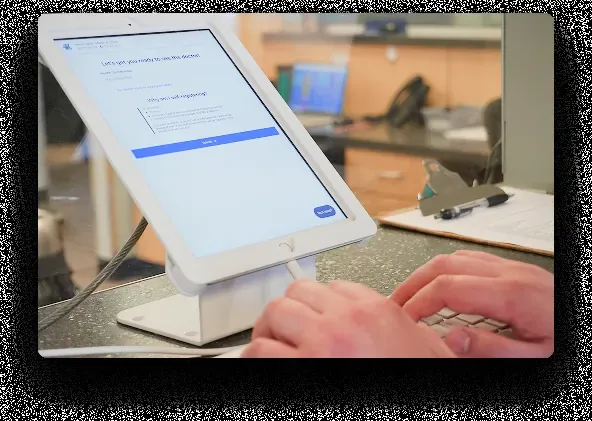
Kiosk tablets with Anti-Theft casing can be purchased directly from Cortico for CAD $950 each.
Allows patients to check in for appointments on their own
Collects and updates patient demographic information
Displays current queue status to patients in the waiting room
WELL Health, Canada's largest outpatient medical clinic owner-operator, deployed the Cortico kiosk to clinics across Canada on Juno EMR: clinics that installed a kiosk updated over 15% more patient addresses and telephone numbers in the first year.
See Kiosk order form here.
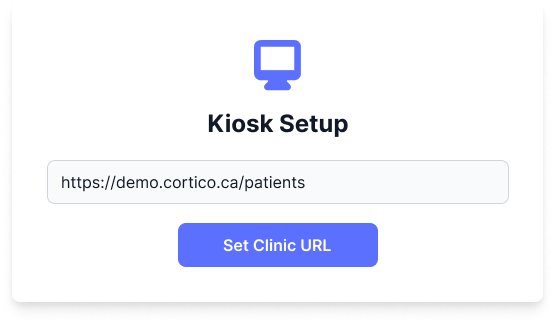
If you already own an iPad, turn it into a distraction-free registration terminal with the Cortico Kiosk app for iOS. Subscription required.
Hides browser bars and navigation controls on your iPad
Simply enter your appointment booking URL to get started
A practical guide for primary-care clinics in Canada and the United States.
A medical clinic kiosk is an iPad-based self-check-in station for patients arriving for an appointment. Instead of beginning every visit at the reception desk, patients can confirm their arrival, update contact details, complete intake steps and provide health-card information on a dedicated terminal. The kiosk sends the completed check-in into the clinic workflow so your team can focus on the exceptions that need a person.
That division of work matters in a busy primary-care clinic. An MOA can spend the first minutes of an appointment checking identity, finding a chart, correcting a phone number, answering a queue question and handing over a form. A patient check-in kiosk handles the routine steps in a consistent order. Your staff still welcome patients, help anyone who needs assistance and resolve clinical or scheduling issues. They spend less time re-keying information.
Cortico's kiosk is part of healthcare's automation network: the same platform can connect booking, reminders, intake, messaging and the in-clinic arrival experience. It is built for family medicine, walk-in clinics and other primary-care teams that need a practical way to reduce front-desk work without splitting patient information across separate tools.
A well-planned check-in kiosk gives patients one clear job when they arrive: complete the steps that make their visit ready for the clinic team. The exact sequence reflects your clinic's workflow, but a typical patient check-in flow looks like this:
This approach reduces the back-and-forth that creates lines at reception. It also gives patients a more private way to review their own information than discussing it within earshot of a waiting room. For a fuller view of the operational benefits, read 6 Benefits of Kiosks in Medical Clinics.
The kiosk does not replace a front desk. It removes the repetitive work that prevents staff from handling the moments where judgment matters. Cortico measures up to 95% less check-in workload for MOAs when the terminal takes on registration, intake questionnaires and health-card collection.
The result is a calmer handoff at the start of the visit. Staff can focus on patients who need help, late arrivals, unexpected scheduling questions, accessibility needs or a conversation that cannot happen on a screen. Clinic managers gain a more consistent registration process because each patient sees the same required steps.
The kiosk also keeps queue status visible. A waiting-room display can show the now-serving number, the number of patients waiting and the next number to be issued. Clinics can use the queue view in the waiting area, and can make the queue available on their clinic site when that suits their workflow. That clarity reduces the need for patients to ask the desk where they are in line.
A kiosk supports better records as well as faster arrival. WELL Health deployed Cortico kiosks in Juno EMR clinics across Canada; clinics that installed a kiosk updated more than 15% more patient addresses and telephone numbers in the first year. That outcome matters because an accurate phone number and address support the reminders, follow-up and communication work that comes after the appointment.
A patient check-in kiosk can start with hardware the clinic already owns or with a ready-to-deploy terminal. Cortico's Kiosk app turns an iPad into a focused registration station by hiding browser bars and other navigation controls. The clinic can enter its appointment-booking URL and keep the device dedicated to check-in.
For clinics that want a complete physical setup, Cortico offers an iPad with anti-theft casing. The current hardware price is $950 per iPad. The kiosk software costs $149 per month for the first terminal and $50 per month for each additional terminal. The Patient Check-In Kiosk is also included in Cortico's Elite plan. A demo can confirm the setup, placement and workflow that make sense for your waiting room: book a demo.
Start deployment with the patient journey, not the device. Place the terminal where patients naturally arrive, make the first instruction visible from a few steps away and keep an assisted path for patients who prefer help. Test the full check-in journey with staff before launch: a scheduled patient, a patient who needs to update details, a patient who needs a form and a patient who needs assistance. That test reveals where your team should step in and what the kiosk should handle on its own.
For a broader explanation of the hardware and workflow options, see Healthcare Kiosks: Types, Uses, and How They Work in Clinical Settings. It distinguishes check-in terminals from feedback, wayfinding and other healthcare kiosk types, so teams can compare the right tools.
A kiosk creates value when the information it collects can support the work the clinic performs next. Cortico connects its patient-engagement tools with EMR systems, so arrival, intake and updated registration information can stay connected to the clinical workflow rather than become another list for staff to reconcile.
Cortico's complete integration tier includes Oscar 19, Juno EMR and Accuro. WELL OscarPro, including KAI and THT, is in the COMPLETE+ tier. These connections give primary-care clinics a starting point for planning an EMR-integrated check-in flow. The exact workflow depends on the EMR, the clinic's configuration and the information the clinic needs to collect, so Cortico confirms those details during onboarding.
This distinction is useful when comparing a patient check in kiosk or medical kiosk in Canada or the United States. A standalone screen can collect information. An EMR-connected workflow can reduce the manual follow-up that otherwise shifts the work from the waiting room to a staff inbox. Ask each vendor where check-in details appear, what staff must review and whether a patient record can be updated without duplicate data entry.
Patients trust a clinic with sensitive personal information at check-in. Cortico is compliant with HIPAA, PHIPA, PIPEDA and PIPA, and its kiosk workflow gives patients a private way to provide registration and intake information. Clinics still set the operational safeguards: choose a placement that avoids screen visibility from the queue, set a device-lock routine, train staff on assisted check-in and define how the team helps patients who need an accessible alternative.
For Canadian clinics, that planning supports PHIPA and PIPEDA responsibilities around appropriate handling of personal health information. For US clinics, a HIPAA-aware workflow begins with the same practical controls: limit screen visibility, verify who can access the device, use the minimum information needed for the task and make help available without asking patients to disclose information in public.
Accessibility is part of service quality, not an edge case. Keep an assisted check-in option for patients who need help with a touchscreen, language, vision, mobility or a complex registration issue. A kiosk should shorten the routine path while staff retain a respectful human path for every patient.
Use these questions to compare patient check-in kiosk options:
The answers help a primary-care team buy for the workflow it needs rather than for a hardware feature list. A clinic with a steady stream of repeat patients may prioritize fast identity and demographic updates. A clinic with more intake requirements may prioritize a guided form flow. Both need a clear handoff to the staff and EMR workflow after the patient finishes.
Choose a kiosk when the clinic needs a dedicated, visible self-service point in the waiting room. The terminal handles the on-site arrival tasks described on this page, including the registration, intake, and health-card workflow the clinic configures.
Choose a patient check-in system when the clinic needs to coordinate pre-registration, patient-directed steps, arrival, and staff handoff across more than the terminal. The two work together. The kiosk is the on-site channel. The system is the workflow around it.
Cortico can walk through a kiosk workflow with your clinic's front-desk team, forms, appointment pattern and EMR. That gives you a concrete view of what patients complete themselves, what your MOAs still manage and how the arrival step connects with the rest of your patient-engagement workflow. Book a demo to review the Patient Check-In Kiosk for your clinic.
For the broader intake workflow around kiosk check-in, explore full patient intake software.
Cortico powers clinics in Surrey, BC, Vancouver, BC, Toronto, ON, North Vancouver, BC, Burnaby, BC, Chilliwack, BC, Calgary, AB, Mississauga, ON, Ottawa, ON, Abbotsford, BC, Victoria, BC, Brampton, ON, and 49+ more cities.
Frequently Asked Questions
A patient check-in kiosk is a self-service terminal patients use when they arrive at the clinic. Cortico’s kiosk is an iPad-based terminal that handles check-in automatically — registration, intake questionnaires, and health card collection — so patients aren’t waiting at the front desk.
Get a demo tailored to your practice.
Active Healthcare Professionals
Tasks Automated Every Month*
As of 2026. *Task = any interaction where Cortico performed a clinical administrative task on a human's behalf.