


At a Glance
| Customer | WELL Health, Canada’s largest outpatient medical clinic owner-operator |
|---|---|
| EMR | Juno EMR, COMPLETE integration with Cortico |
| Product | Cortico Clinic Kiosk and Queue System |
| Outcomes | • Front desk freed from check-in to focus on patient interaction • Intake details and consents captured before the appointment starts • Over 15% more addresses and telephone numbers updated • Clinic notices delivered while the patient checks in • High-volume periods managed without increasing admin headcount |
Overview
WELL Health is Canada’s largest outpatient medical clinic owner-operator, running more than 275 multidisciplinary clinics and supporting over 4.9 million patient visits per year. Its primary care clinics run on Juno EMR.
Challenge: The 90-Second Window
In a busy WELL Health clinic, the front desk is the most compressed operational environment. Staff have about ninety seconds per patient, and in that window they must handle identity confirmation, coverage verification, consents, and contact updates.
Reliance on manual, repetitive entry in this setting risks data errors, creates bottlenecks, and limits staff availability to provide a warm and personal greeting to patients. The team explained that busy practices often struggle to capture this information properly by hand.
Solution: Cortico’s Tablet-Based Kiosk
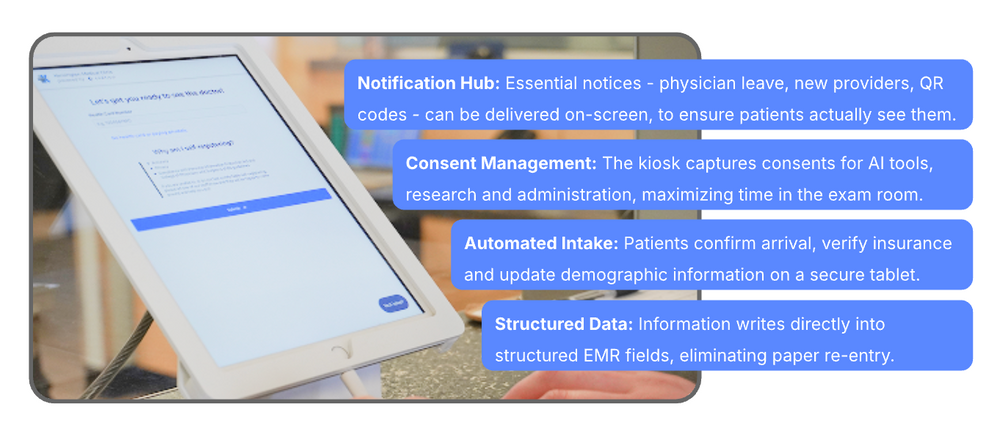
WELL Health deployed Cortico’s healthcare kiosk to clinics across Canada. Patients complete check-in and registration themselves on a secure tablet near the entrance, confirming their identity, verifying coverage, updating their demographic details, and signing any consents the visit requires.
The kiosk issues a queue number at the end of check-in. A clinic’s current position can be shown on a waiting room display and published to its own website, so a patient who arrives early can see how many are ahead of them.
What the patient enters into the kiosk writes directly into structured fields in Juno EMR, so the same information does not have to be re-keyed at the desk or during the appointment.
Impact: Greater Efficiency and a Calmer Front Desk
WELL Health reports that the kiosk delivered gains in both operational metrics and staff morale.
Restored Human Connection
A common objection to check-in kiosks is that they remove the human touch. Staff at WELL report the opposite, claiming the kiosk allows them to focus more on patient interaction. With reception staff freed from data entry, patients get a warm, meaningful greeting upon arrival.
WELL staff are instructed to greet the patient warmly first, then direct them to the kiosk for the administrative part of check-in.
Improved Clinical Efficiency
Demographics, intake details, coverage information, and consents are now captured before the visit starts, so physicians don’t lose time repeating administrative questions and basic medical history.
Standing questions like allergies and flu shot status are handled at check-in, so the visit starts with that information already in hand.
Enhanced Data Quality
Because patients update their own contact details as part of check-in, a wrong address or phone number gets corrected by the person it belongs to. WELL Health clinics report a significant increase in demographic accuracy since implementing the kiosk.
Over 15% more addresses and telephone numbers were updated in the first year across WELL clinics that installed a kiosk.
Strategic Communication
The check-in screen doubles as a notice board for announcements a clinic needs patients to see, such as a physician going on leave or a new provider accepting patients. Notifications reach the patient while they are already looking at the screen and paying attention, and the front desk does not have to raise each one with every patient.
Mitigated Staffing Shortages
By offloading routine check-ins, the kiosk acts as a virtual extension of the front desk. This means clinics can manage high-volume periods and decrease wait times without increasing headcount.
Looking Ahead
By transferring repetitive data entry to the kiosk, medical office assistants at WELL Health can focus on high-value patient support rather than routine administrative tasks. The kiosk has also improved patient record accuracy, enhanced clinical efficiency, and given clinics a reliable way to communicate important notices to patients.
WELL Health plans to extend the Cortico kiosk to its remaining clinics in British Columbia.
Getting Started with Cortico’s Kiosk
Cortico’s kiosk moves check-in and intake off the front desk and onto a tablet patients use independently, eliminating up to 95% of the check-in workload for MOAs. The kiosk writes directly into the clinic’s existing EMR, so any information the patient adds is immediately available to the front desk and clinicians.
Clinics can also display current queue status in the waiting room and on their website, so patients can see their status without asking.
