




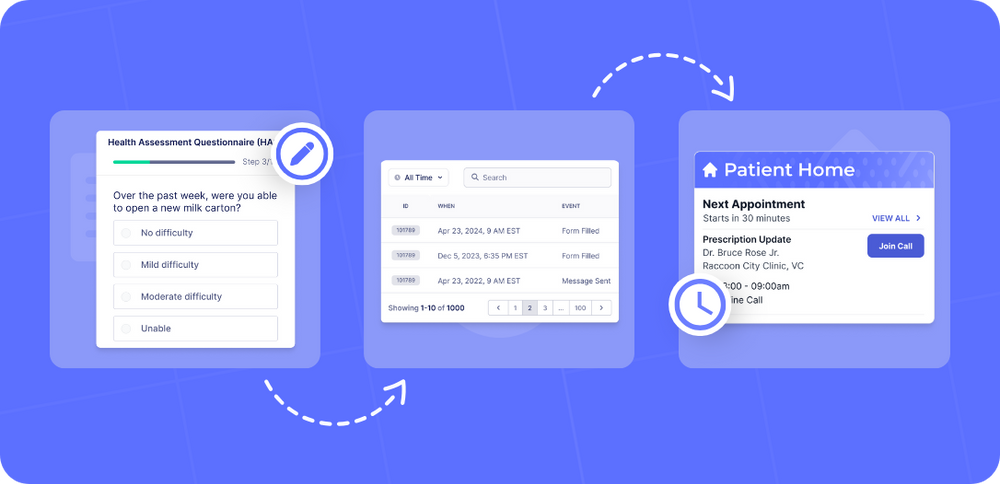
Successfully integrating a patient intake system requires more than just installation. This guide shares the keys to success and proven tactics from Cortico’s implementation team.
Based on extensive real-world experience with hundreds of customers, these insights highlight what truly works to build the perfect intake process, and they can be readily applied to any patient intake platform. We expect these tactics to work well with other patient intake systems too!
Why Good Patient Intake Processes are Essential
The importance of thorough and accurate patient intake cannot be overstated.
What happens during this initial stage of contact impacts the entire care journey, affecting patient safety, financial performance, operational efficiency, clinician well-being, and clinical outcomes.
Overall, efficient and user-friendly intake processes set the stage for positive outcomes throughout the entire care journey. When undertaken thoughtfully, patient intake helps the clinician understand the patient’s needs, strengthens the provider-patient relationship, and ensures that all patients are properly informed before receiving treatment.
We’ve covered the benefits of good patient intake processes in more detail in a previous article, titled 6 Key Benefits of Patient Intake Software.
Key Challenges with Patient Intake
Even with the medical software tools now used in many healthcare practices, both providers and patients continue to struggle with certain aspects of intake processes. Understanding these challenges is essential to appreciating why digital transformation of intake processes has become such an urgent priority.
Intake Pain Points for Providers
- Time-consuming - Depending on the setting, intake can require 30 minutes or more of administrative and clinical time for each patient.
- Competes with clinical time - Time clinicians spend on patient intake reduces the total available time for clinical care.
- Involves many clerical-type tasks - Clinicians are often required to complete tedious admin tasks that negatively impact job satisfaction.
- High-risk for errors - Despite the admin-heavy nature of patient intake, any errors at this stage pose a high risk for adverse outcomes.
Intake Pain Points for Patients
- Long wait times - Patient intake is often the bottleneck that causes significant wait times for patients after arriving at clinic.
- Repetitive paperwork - Patients frequently become exasperated at having to repeatedly answer the same questions verbally or in forms.
- Privacy concerns - Patients may feel uncomfortable about having to disclose private information at pre-care delivery stages.
- Fragmented communication - Patient intake is often undertaken by several different staff members, leading to disjointed communications.
These mounting challenges demonstrate that a manual-intensive patient intake process is unsustainable. To overcome administrative burden, minimize errors, and deliver the modern experience patients expect, healthcare practices must transition to digital patient intake solutions.
Automating Intake - Keys to Success
Successful patient intake is no longer about managing individual steps; it’s about deploying a unified system of healthcare workflow automation. The right software will optimize every stage of intake, keeping the process running smoothly and securely.
It’s critical that you not only know what digital tools are at your disposal, but how each one impacts the intake experience.
Now, let’s take a look at the patient intake keys to success.
Scheduling
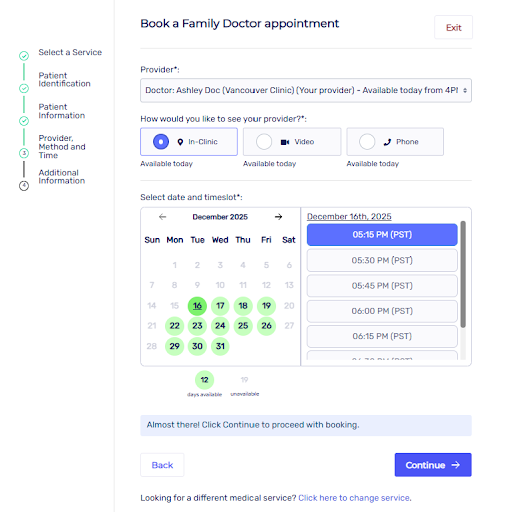
Get 100% of your patients booking online! By automating scheduling and registration, you can keep your patients’ contact information up-to-date within your own EMR. 24/7 accessibility and real-time availability help fill gaps and optimize the provider’s schedule, ensuring efficient use of resources. Give your patients the flexibility and discretion of scheduling their appointment through your online booking website - no separate account setup required!
Forms
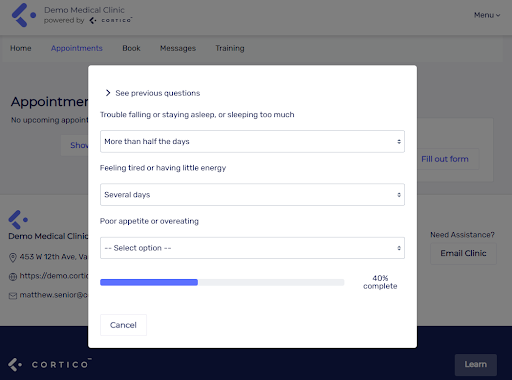
Does your clinic have standard intake forms that you administer to new or returning patients? General forms such as PHQ-9 or GAD-7 can be digitized and automated as part of your holistic patient intake process, as well as more complex forms tied to specific appointment types or specialists. Fully customizable intake forms capture the exact data needed in a consistent format, which can then be synchronized directly into the EMR as structured data, PDF, or raw text.
Forms can be added to the appointment booking workflow, or sent securely by clinic staff to ensure all the necessary information is captured prior to the patient’s appointment. Creating and updating forms should be straightforward and manageable for clinic staff (make sure you reach out to your Cortico support team who are happy to help you set up and test your digital forms for a seamless patient experience).
Reminders
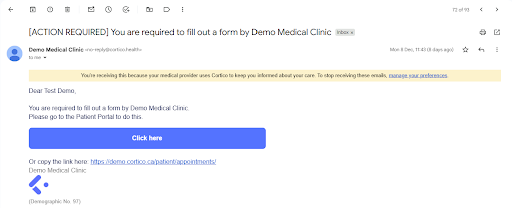
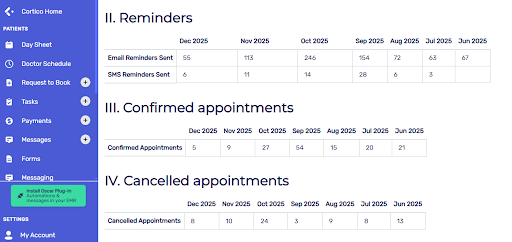
Automated appointment reminders engage patients with timely email and SMS touchpoints. Our team has found that to reduce no-shows, reminders should be consistently sent to the patient’s primary email 7, 2, and 1 day(s) prior to their scheduled appointment. An additional text message 90 minutes before keeps the appointment top-of-mind and ensures patients show up ready and on time.
Automated reminders can allow patients the opportunity to cancel their appointment earlier (in accordance with your clinic’s policy) to free up your provider’s schedule for new bookings. Keep track of these communications with easy-to-read, real-time digital dashboards, allowing staff to observe and optimize the impact of their reminders.
Billing
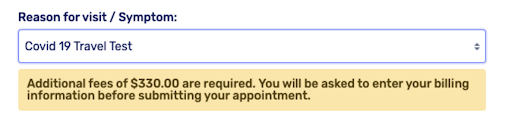
Automate billing and collect payments during online booking or post-visit, or enable paid subscriptions for applicable services. Fee types might include out-of-province fees, private patient, no-show/late cancellation, and anything your clinic would need enabled as part of patient intake. Our platform integrates your clinic’s Square account to easily collect patient payments and ease the burden on administrative staff.
Optimizing Your Patient Intake Process with Cortico
Cortico is a patient intake and clinic automation system that implements many of these best practices out of the box. Here are the tactics we have seen drive the most successful intake outcomes, and how to implement them.
Promote Cortico In Your Clinic
Helping patients easily find and engage with Cortico ensures strong adoption:
- On Your Website: Patients need to find your online booking, and it should be your preferred option on your website. The most visible button should be ‘book online’.
- Update Phone Messaging: Integrate a clear call-to-action into your phone greeting, directing patients to the website as the fastest way to schedule.
- Use Point-of-Care Promotion: Place booking posters with QR codes prominently in the clinic to provide a quick, physical gateway to the online scheduling link.
Adjust Workflows Where It Makes Sense
Here’s how to supercharge your workflow to accomplish more in less time, without sacrificing care quality:
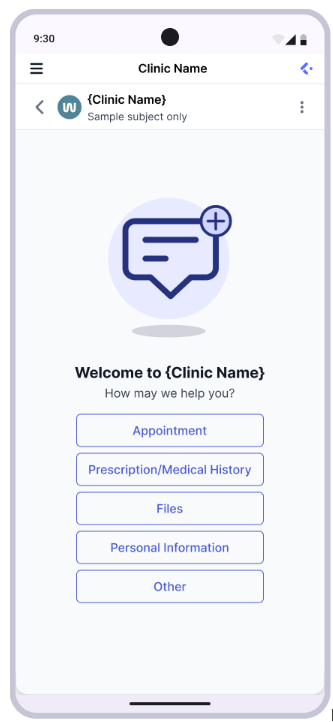
- Start Using Email with Patients, Instead of the Phone: You should shift from a phone workflow to an email workflow if you haven’t already. Use a shared email address for your clinic. Patients are used to email (or will be soon) from using Cortico.
- Automate Registration and Check-in: Allow patients to check in for appointments on their own, collect and update patient information and display current queue status to patients in the waiting room by setting up a check-in kiosk.
- Digitize Your Paper Forms: Instead of handing out paper intake forms to patients in the clinic, share them with your Cortico support team so we can create a fully digital and secure version they can complete online before their appointment.
Zooming in: On Your Booking Website
These tips help clinics get the most out of their booking website:
- Set Up a Payment Feature on Your Booking Site: Fees are collected online via credit card, and payments are deposited directly into the clinic’s Square account.
- Advertise No-Show Fees: Clearly communicate and advertise no-show fees during the online booking process to establish a financial and behavioral expectation (“social contract”) upfront.
- Automate Fee Enforcement: For repeat offenders, use automation to block them from future booking until a pending no-show fee is resolved (reserving this strong measure to effectively manage persistent non-compliance).
- Facilitate Easy Cancellation: The online reminder system provides a simple, direct mechanism for patients to cancel their appointment, which allows the clinic to immediately offer that slot to another patient and keep the schedule full.
To see how Cortico can upgrade your patient intake processes and clinic operations, book a demo today.
