



A patient books online. The appointment appears on the schedule, but staff still need to call: the visit needs a longer slot, the patient has not completed the required form, or the booking belongs with a different provider.
Online booking helps when the appointment is ready for the team to deliver. That takes clear booking rules and a reliable handoff from scheduling to intake and reminders.
This guide walks through patient scheduling best practices you can apply to one appointment type before expanding across your clinic.
Start with a patient scheduling checklist
Review the workflow with the people who manage the schedule, prepare charts and see patients. Choose a common appointment type and write down what makes a booking appropriate, what happens next and who handles exceptions.
Start with a service your team understands well. A routine follow-up may be easier to define than a new consultation with several referral requirements.
Define the appointment before opening the calendar
A calendar shows availability. Your booking rules explain which availability a patient can use.
For each appointment type, agree on the following:
| Decision | What to document |
|---|---|
| Patient eligibility | Existing or new patient, referral requirements and any review needed before booking |
| Duration | The slot length and any preparation or turnaround time |
| Provider and location | Who can deliver the visit and where it takes place |
| Visit format | In-person, phone or virtual, with clear patient instructions |
| Booking window | How far ahead patients can book and the cutoff for a new booking |
| Preparation | Forms, documents or instructions needed before the visit |
| Changes | How patients cancel or request a different time |
Keep clinical eligibility decisions with the appropriate clinical team. A booking form can collect information; it should not silently turn an administrative answer into a clinical decision.
Make booking status clear to patients
A confirmed appointment and a request for an appointment are different promises.
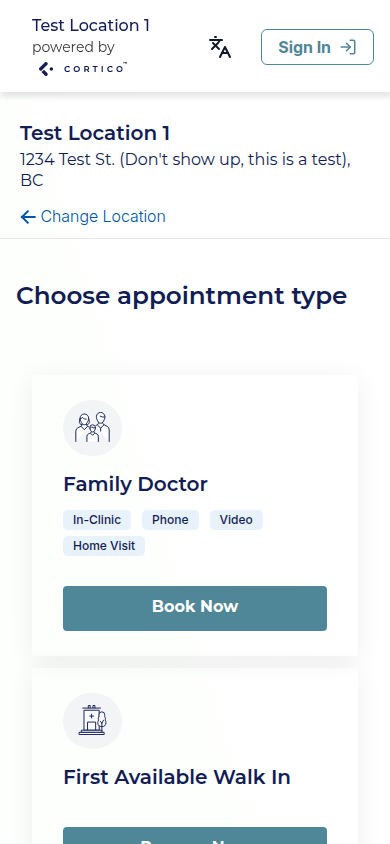
If patients can choose a valid slot and receive confirmation, tell them the date, time, location and visit format. If staff must review the request first, say that the appointment is pending and explain what happens next.
For example, a request acknowledgement might say:
Use this wording only where it matches your process. Avoid showing a confirmation-style message while staff still need to approve the booking.
Cortico’s patient scheduling software connects online booking with supported EMRs. During setup, check how appointment types, provider availability and booking status work with your specific integration.
Connect booking, intake and reminders
A useful scheduling workflow continues after a slot is selected.
- Record the appointment. Check that the correct patient, provider, visit type and time appear in the EMR.
- Request the right preparation. Send the forms or instructions needed for that visit, using your clinic’s secure collection process.
- Track completion. Give staff a way to identify missing preparation before the appointment.
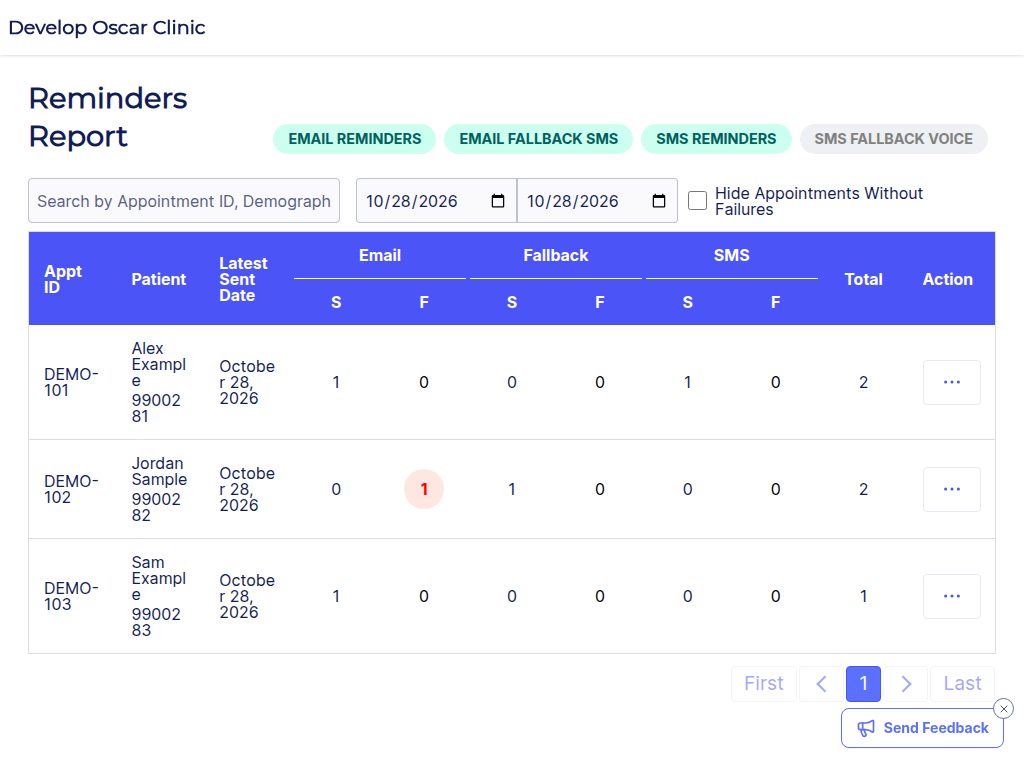
- Send the reminder. Make sure it reflects the current appointment details and explains the next action.
- Prepare the visit. Route responses and exceptions to the team member responsible for reviewing them.
For a routine follow-up, the patient might need an updated history rather than a full new-patient registration package. For a first visit, staff may need both registration details and clinical history.
Cortico’s patient intake workflow can collect information before the visit. Confirm where those responses appear in your EMR and who reviews them. A completed form still needs the appropriate staff or clinical review.
Give scheduling exceptions an owner
A workflow needs a clear path for appointments that do not proceed as expected.
| Situation | A practical response to define |
|---|---|
| Patient chooses the wrong appointment type | Who checks the booking and contacts the patient |
| Required preparation is missing | When staff follow up and who decides whether the visit can proceed |
| Patient asks to reschedule | Which channel they use and who updates the appointment |
| Reminder cannot be delivered | Who checks contact details and whether another approved channel is appropriate |
| A slot becomes available | Who decides whether and how to offer it to another patient |
| Patient needs help booking | The phone or in-person route available to them |
Do not assume a patient has cancelled because they did not answer a reminder. Define what counts as a cancellation and make sure the schedule reflects the actual decision.
Patients who cannot use online booking still need access. Keep an assisted route and make the instructions easy to find alongside the online option.
Handle specialist bookings after referral review
Specialist appointments may depend on referral acceptance, visit priority, provider choice or required documents. Those decisions need to happen before an eligible patient is invited to book the appropriate visit.
Cortico’s specialist booking workflow supports a referral-based booking process. Walk through the handoff with your team: who approves the referral, which appointment options the patient receives and what happens if the patient does not book.
An invitation is one step in the process. Staff still need a way to find referrals awaiting action and bookings that need assistance.
Pilot one workflow and measure staff effort
Before opening more appointment types, test the full journey with an approved test patient or your team’s established testing process. Check the booking message, EMR entry, intake request and reminder. Then test a change of time and a cancellation.
Measure outcomes for the same appointment type before and after the change:
- Staff calls or messages needed to complete a booking.
- Bookings that need correction after the patient selects a slot.
- Required forms completed before the visit.
- Missed appointments and late cancellations.
- Failed reminders and unresolved requests.
Track the number of appointments behind each measure. Five missed appointments out of fifty bookings is different from five out of five hundred. Compare similar periods and note changes in staffing or appointment availability.
Use what you find to adjust one part of the process. If patients repeatedly choose the wrong visit type, clearer labels may help more than sending another reminder.
Frequently asked questions
Should every appointment type be available online?
Start with appointment types that have clear eligibility and preparation rules. Services requiring review can use a request or invitation workflow, with staff assistance where needed.
Does online booking replace the receptionist?
Staff still handle exceptions, help patients and coordinate care. The aim is to reduce repeated scheduling tasks so they can spend more time on the bookings that need attention.
What should we check in an EMR integration?
Check appointment types, provider schedules, booking status, changes, cancellations and where intake responses appear. Review Cortico’s EMR integrations and demonstrate the workflow with your own appointment rules before rolling it out.
Want to see how your schedule connects to the rest of the visit? Bring one appointment type and its current booking steps to a Cortico demo. Walk through booking, preparation and a schedule change with your team.
